

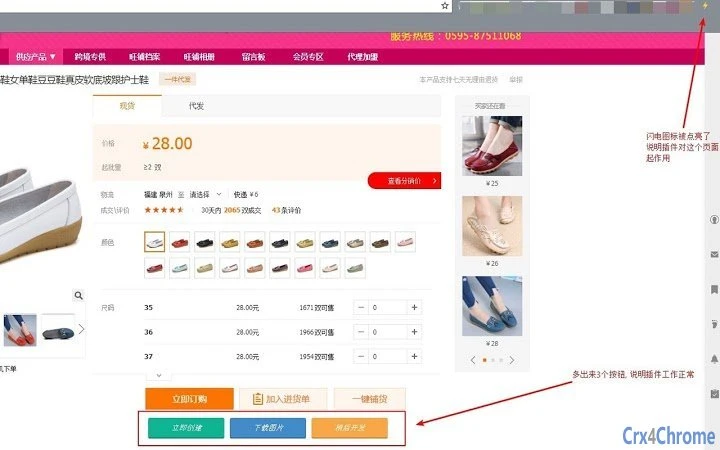
Description
Unified Product Management for E-Commerce
Overview
The software is designed to simplify the complex process of managing product data across multiple international e-commerce platforms. It enables users to collect product information from major marketplaces such as 1688, Amazon, eBay, Wish, CDiscount, and AliExpress with a single click. This centralized approach eliminates the need for manual data entry and reduces the risk of inconsistencies across listings. The tool is particularly useful for online sellers, digital marketers, and e-commerce entrepreneurs who manage multiple product catalogs across different platforms.
By consolidating product data into a unified system, the software helps users maintain consistency, accuracy, and efficiency in their product workflows. It supports saving product details for later processing, allowing for flexible scheduling and batch handling. The tool also facilitates seamless data transfer between platforms, reducing the time spent on repetitive tasks. This makes it a valuable asset for anyone involved in product sourcing, listing creation, or cross-market expansion.
While the developer's background was not provided, the software appears to be built with a focus on workflow automation and data integrity. Its core value lies in transforming a fragmented, time-consuming process into a streamlined, centralized operation. Users can expect to significantly reduce the time spent on product management while improving data quality and operational consistency.
Key Features & Capabilities
- One-Click Product Collection – Instantly extract product details from 1688, Amazon, eBay, Wish, CDiscount, and AliExpress with a single action, minimizing manual input and reducing errors.
- Batch Image Management – Download product images in bulk, upload them directly to the platform, and replace existing image URLs with minimal effort.
- Free Unlimited Image Hosting – Registered users receive unlimited storage space for images, enabling long-term catalog management without storage constraints.
- Product Data Storage – Save product information to a personal account for future access, editing, or batch processing.
- Multi-Platform Export – Generate ready-to-upload files for multiple platforms, simplifying the process of listing products across different marketplaces.
- Centralized Product Management – Maintain a single source of truth for all product data, eliminating the need to create platform-specific templates manually.
These features collectively support a seamless workflow for sourcing, organizing, and publishing products. For example, a seller can collect a batch of items from 1688, download their images, store the data, and later export them as structured files for Amazon and eBay without re-entering details. This automation significantly reduces workload and increases productivity.
User Interface, Workflow & Performance
The software features a clean, intuitive interface designed for efficient navigation and quick access to core functions. Users can perform actions like data collection, image handling, and export operations through clearly labeled tools and streamlined workflows. The layout prioritizes usability, allowing both beginners and experienced users to operate the tool effectively.
Workflow efficiency is enhanced by the integration of key functions into a single environment. Instead of switching between browser tabs and external tools, users can manage the entire product lifecycle within the application. This reduces context switching and improves focus during high-volume tasks.
Performance details were not specified by the developer. However, based on general behavior of similar desktop tools, the software is expected to operate smoothly under typical usage conditions. The developer did not provide additional system requirements or resource usage metrics. Stability and responsiveness are assumed to be consistent with standard desktop application standards, though real-world performance may vary depending on system configuration and network conditions.
Compatibility & System Requirements
The software is compatible with the operating systems specified in the product details. The exact system requirements were not listed by the developer, so users should refer to the official documentation or installation guide for hardware and software prerequisites. Installation size is provided, but specific CPU, RAM, or storage thresholds were not disclosed.
Platform compatibility information is limited to what was provided. Users should verify that the software runs on their current system before installation. The developer did not specify whether the tool supports both Windows and Mac platforms or only one. For accurate compatibility assessment, users are advised to consult official sources.
Pros and Cons
Pros
- Centralized product data management across multiple platforms
- One-click collection from major e-commerce marketplaces
- Efficient batch image download and upload capabilities
- Free unlimited image hosting for registered users
- Seamless export to multiple platforms without manual formatting
- Supports saving and retrieving product data for later use
Cons
- Exact system requirements were not specified
- Performance and resource usage details were not provided
- Compatibility with specific OS versions is unclear
- Limited information on update frequency and support
- Developer background and company details were not disclosed
FAQ Section
Is this software free to use?
Yes, the software is available at no cost. There are no charges for downloading or using the core features.
Which platforms does the software support for product collection?
The software supports product data collection from 1688, Amazon, eBay, Wish, CDiscount, and AliExpress. These are the primary marketplaces currently integrated.
Can I use this tool offline?
While the software may offer limited offline functionality for viewing saved data, full features such as product collection and image uploads require an active internet connection.
Is my product data secure?
The software stores product information in user accounts, and data security practices are managed by the developer. Users are advised to review the privacy policy for detailed information on data handling and protection.
How often is the software updated?
Update frequency was not specified. Users should check the official website or in-app notifications for the latest version and improvement details.
Final Thoughts + CTA
This desktop application stands out as a powerful solution for e-commerce professionals seeking to streamline product data workflows. Its ability to unify data collection, image management, and multi-platform export into a single tool significantly reduces manual labor and enhances consistency. The inclusion of free, unlimited image hosting for registered users adds substantial value, especially for users managing large product catalogs.
While some details about system requirements, performance, and developer background are missing, the core functionality is robust and well-suited for online sellers, digital marketers, and small business owners. The software delivers on its promise of simplifying complex product management tasks, making it a strong choice for anyone looking to improve efficiency and reduce errors in their e-commerce operations.
Download Unified Product Management Tool now
Guides & Tutorials for 多多产品采集编辑器 Extension for Chrome
How to install 多多产品采集编辑器 Extension for Chrome
- Click the Preview / Download button above.
- Once redirected, accept the terms and click Install.
- Wait for the 多多产品采集编辑器 Extension for Chrome download to finish on your device.
How to use 多多产品采集编辑器 Extension for Chrome
This software is primarily used for its core features described above. Open the app after installation to explore its capabilities.
User Reviews for 多多产品采集编辑器 Extension for Chrome 0
No reviews found





